The Direct Carrier Billing (DCB) HTTP API allows authorized customers (Service Providers) to charge mobile users directly through their mobile phone balance (prepaid) or postpaid billing account when they purchase digital content or subscription-based services. This enables users to complete payments easily without using credit cards or Digital Payment by confirming the transaction through their mobile number.
It is strongly recommended to integrate the API in alignment with the Service Program documentation provided by the Airpay technical team during the service setup process to ensure compliance with telco requirements and smooth end-to-end operation.
API HE + OTP
This API will be used by Telco who only needed redirect url to Telco's subscription page. The subscription process including HE + OTP will be handled directly by Telco.
Sample request :
curl -X GET "https://{domain}/api/v1/ext/{CHANNEL}/{TELCO}/{SERVICE}/subscribe?apikey={APIKEY}&clickid={PIXEL}"
Note: API request is made over HTTP(S).
Authorizations:
path Parameters
| channel required | string <= 50 characters Channel name |
| telco required | string <= 150 characters Telco masking code |
| service required | string <= 50 characters Service |
query Parameters
| apikey required | string <= 150 characters API key |
| clickid required | string <= 50 characters Tracking ID for campaign |
Responses
Response samples
- 200
{- "code": 200,
- "message": "success",
}APIs for otp subscription and related operations
V1 — /api/v1/ext/* endpoints (Send OTP, Subscription with OTP).
V2 — /api/v2/ext/* endpoints (XL merchant full flow: Request Token, Send OTP, Confirm OTP). Every request except Request Token requires a Bearer Token, obtained first via Basic Auth on the Request Token endpoint.
API Subscribe - Send OTP
This API is used for telco providers that require the DCB process via OTP verification. The API will send an OTP code for the next step in the process.
Sample request :
curl -X GET "{domain}/api/v1/ext/{CHANNEL}/{TELCO}/{SERVICE}/send/otp?apikey={APIKEY}&clickid={PIXEL}&msisdn={MSISDN}"
Note: API request is made over HTTP(S).
Authorizations:
path Parameters
| channel required | string <= 50 characters Channel name |
| telco required | string <= 150 characters Telco masking code |
| service required | string <= 50 characters Service |
query Parameters
| apikey required | string <= 150 characters API key |
| clickid required | string <= 50 characters Tracking ID for campaign |
| msisdn required | string <= 50 characters Mobile subscriber number (MSISDN) |
Responses
Response samples
- 200
{- "code": 200,
- "message": "success",
- "data": {
- "otp_key": "7872f482520d5aca486cb90884ea845f"
}
}API Subscription with OTP
This API is used for telco providers that require the DCB process via OTP verification. This API will used to verify the OTP code that has been previously sent to the customer and this process will complete the subscription initiated by the customer.
Sample request :
curl -X GET "{domain}/api/v1/ext/{CHANNEL}/{TELCO}/{SERVICE}/otp/subscribe?apikey={APIKEY}&otp_key={OTP_KEY}&otp_value={OTP_VALUE}"
Note: API request is made over HTTP(S).
Authorizations:
path Parameters
| channel required | string <= 50 characters Channel name |
| telco required | string <= 150 characters Telco masking code |
| service required | string <= 50 characters Service |
query Parameters
| apikey required | string <= 150 characters API key |
| otp_key required | string <= 50 characters OTP key from API send OTP |
| otp_value required | string <= 50 characters OTP from sms |
Responses
Response samples
- 200
{- "code": 200,
- "message": "success"
}XL Full Flow
Complete (full flow) subscription integration guide for the XL merchant, version 2 (DCB v2), using the /api/v2/ext/* endpoints.
Key difference from V1: every request (except Request Token) requires a Bearer Token in the Authorization header. The token is obtained first through the Request Token endpoint using Basic Auth.
| Field | Value |
|---|---|
| Merchant / Channel | XL |
| Operator | XL |
| Channel | wap |
| Country | ID |
| Base URL | https://api.airpay.mobi |
| API Key | YOUR_API_KEY |
| HTTP Method | GET |
| Authentication | Basic Auth (Request Token) → Bearer Token (other endpoints) |
| SMS Sender (SDC) | 99876 |
Endpoint call order:
- Request Token — obtain a Bearer Token via Basic Auth (client id & client secret).
- Sub Request Pin (Send OTP) — send an OTP to the customer; returns the
otp_key. - Subscribe Confirm OTP — verify the OTP (
otp_key+otp_valuefrom SMS 99876). - Unsubscribe — cancel the subscription.
Flow Summary: Request Token → Send OTP → SMS 99876 → Confirm OTP → Subscription Active
2. Authentication
2.1 Basic Auth (Request Token only)
The Request Token endpoint uses HTTP Basic Auth. The username is the merchant's client id and the password is the client secret. Credentials are Base64-encoded in the format username:password and sent in the Authorization header.
| Field | Value |
|---|---|
| username (clientId) | YOUR_CLIENT_ID |
| password (clientSecret) | YOUR_CLIENT_SECRET |
Authorization header (Base64 result):
Authorization: Basic WU9VUl9DTElFTlRfSUQ6WU9VUl9DTElFTlRfU0VDUkVU
2.2 Bearer Token (other endpoints)
The token obtained from Request Token is sent as a Bearer Token on all subsequent endpoints (Send OTP, Confirm OTP, Unsubscribe), via the header:
Authorization: Bearer <token>
IMPORTANT: The Bearer token expires every 1 hour. Once expired, call Request Token again to obtain a new token.
3. Common Parameters
Values inside curly braces { } are dynamic and must be replaced with actual values when making the call.
| Parameter | Required | Description |
|---|---|---|
apikey |
Yes | Merchant API key: YOUR_API_KEY |
service |
Yes | The service code being subscribed to. |
clickid |
Yes | Unique customer session/click ID (tracking). |
msisdn |
Yes | Customer phone number. |
otp_key |
Yes | OTP key returned by the Send OTP endpoint. |
otp_value |
Yes | OTP code received by the customer via SMS from 99876. |
4. Integration Steps
Step 1 — Request Token GET
Obtain a Bearer Token using Basic Auth.
https://api.airpay.mobi/api/v2/ext/ID/wap/{service}/YOUR_API_KEY/token/
Authentication: Basic Auth — username = clientId, password = clientSecret
| Path | Value |
|---|---|
| country | ID |
| channel | wap |
| service | {service} |
| apikey | YOUR_API_KEY |
Result: The response contains data.token. This token is used as the Bearer Token in the next steps (in Postman it is automatically saved to the xToken variable).
Step 2 — Sub Request Pin (Send OTP) GET
Send an OTP code to the customer.
https://api.airpay.mobi/api/v2/ext/wap/XL/{service}/send/otp?apikey=YOUR_API_KEY&clickid={clickid}&msisdn={msisdn}
Headers: apikey: {apiKey} · Authorization: Bearer {token}
| Parameter | Required | Description |
|---|---|---|
| apikey | Yes | YOUR_API_KEY |
| clickid | Yes | Unique customer session ID. |
| msisdn | Yes | Target customer phone number for the OTP. |
Result: Returns the otp_key, and the customer receives an SMS containing the OTP code from 99876.
Step 3 — Subscribe Confirm OTP GET
Verify the OTP to activate the subscription.
https://api.airpay.mobi/api/v2/ext/wap/XL/{service}/otp/subscribe?apikey=YOUR_API_KEY&otp_key={otpKey}&otp_value={otpValue}
Headers: apikey: {apiKey} · Authorization: Bearer {token}
| Parameter | Required | Description |
|---|---|---|
| apikey | Yes | YOUR_API_KEY |
| otp_key | Yes | otp key from step 2 (Send OTP). |
| otp_value | Yes | OTP code received by the customer via SMS from 99876. |
Result: If successful, the customer is successfully subscribed to the service.
Step 4 — Unsubscribe GET
Cancel the customer's subscription.
https://api.airpay.mobi/api/v2/ext/wap/XL/{service}/unsubscribe?apikey=YOUR_API_KEY&msisdn={msisdn}
Headers: apikey: {apiKey} · Authorization: Bearer {token}
| Parameter | Required | Description |
|---|---|---|
| apikey | Yes | YOUR_API_KEY |
| msisdn | Yes | Phone number of the customer to unsubscribe. |
Result: The customer's subscription to the service is cancelled.
5. Important Notes
- The Bearer token expires every 1 hour. Once expired, call Request Token again.
- username = merchant client id, password = merchant client secret.
- Request Token uses Basic Auth with Base64 encoding (format
username:password). - All endpoints except Request Token must include the
Authorization: Bearer <token>header and theapikeyheader. - Values inside curly braces
{ }(e.g.{service},{clickid},{msisdn},{otpKey},{otpValue}) must be replaced with actual values. - The OTP code is delivered via SMS from sender/SDC 99876; that value is used as
otp_valuein the Confirm OTP step. - The apikey and client secret are confidential — do not share them with unauthorized parties.
Authorizations:
Responses
API Unsubscription
This API will be used for telco providers that have a subscription process. If a customer wants to unsubscribe from a service, this API will be used. This process applies only to services that implement a subscription model.
Sample request :
curl -X GET "{domain}/api/v1/ext/{CHANNEL}/{TELCO}/{SERVICE}/unsubscribe?apikey={APIKEY}&msisdn={MSISDN}"
Note: API request is made over HTTP(S).
Authorizations:
path Parameters
| channel required | string <= 50 characters Channel name |
| telco required | string <= 150 characters Telco masking code |
| service required | string <= 50 characters Service |
query Parameters
| apikey required | string <= 150 characters API key |
| msisdn required | string <= 50 characters Mobile subscriber number (MSISDN) |
Responses
Response samples
- 200
{- "code": 200,
- "message": "success"
}This section provides a comprehensive list of error codes and their corresponding descriptions that may be encountered during API interactions.
| Code | Message |
|---|---|
| 400 | Bad request |
| 500 | Internal system error |
| 900 | Invalid signature |
| 901 | Invalid token |
| 902 | Token expired |
| 903 | Invalid channel |
| 904 | Invalid telco |
| 905 | Invalid service id |
| 906 | Invalid msisdn |
| 907 | Invalid OTP |
| 9071 | Invalid OTP key, not found or expired |
| 9072 | Invalid OTP value or not found |
| 908 | Channel not active |
| 909 | Telco not active |
| 910 | Service id not active |
| 911 | Duplicate trxid |
| 912 | Invalid Source or source may not register to this service |
DCB Airpay Account Creation
Requirement: Valid Email Address
Note: After admin verification, merchant will be provided with login credentials to Airpay messaging platform at http://reports.airpay.mobi
Service Data Availability
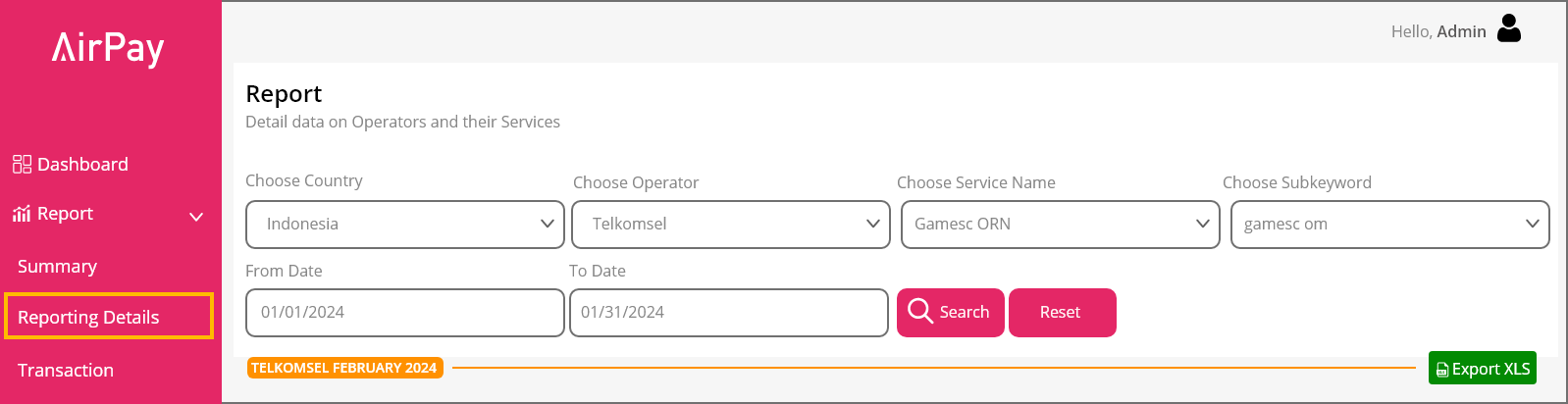
Following the creation of the Airpay account, partners can navigate to the "Report/Reporting Details" section in the navigation bar. This area will display all relevant service data once the service integration has been successfully completed as shown in Figure 2
Provisioning Of Integration Urls
MO Url: Reply URL at CP Server (If Applicable) for receiving HTTP MO
Example. 1) http://partner.com/mo
Example. 2) http://partner.com/mobile-originating
Example. 3) https://203.208.172.216:8080/airpay/mo
DN URL: Reply URL at CP Server (If Applicable) for Receiving DN
Example. 1) http://partner.com/dn
Example. 2) http://partner.com/delivery-notification
Example. 3) https://203.208.172.216:8080/airpay/dn
Note: Each merchant is required to provide only one MO (Mobile Originated) and one DN (Delivery Notification) URL. The furnished URLs should be intended for production purposes.
We expected the merchant to send a response “OK” when the process is success
Sample:
https://{{domain}}/mo?event=MOREG&operator={operator}&sdc={shortcode}&msisdn={msisdn}&service={service}&trx_id={trxid}&trx_date={trxdate}, Response: OK, Status: 200 OK, Status Code: 200,
https://{{domain}}/dn?event=FP&operator={operator}&sdc={SHORTCODE}&msisdn={MSISDN}&service={SERVICE}&trx_id={TRXID}&trx_date={TRXDATE}&click_id={CLICKID}&status={STATUS}&status_desc={STATUS_DESC}, Response:OK , Status: 200 OK, Status Code: 200,
MO HTTP Interface
Whenever users initiate an MO request from their mobile phone, the Messaging Platform will forward the request to the content provider's URL using GET method.
The basic format of a MO request for REG is shown below:
https://{{domain}}/mo?event=MOREG&operator={operator}&sdc={shortcode}&msisdn={msisdn}&service={service}&trx_id={{trxid}}&trx_date={trxdate}&click_id={clickid}
The basic format of a MO request for UNREG is shown below:
https://{{domain}}/mo?event=MOUNREG&operator={operator}&sdc={shortcode}&msisdn={msisdn}&service={service}&trx_id={trxid}&trx_date={trxdate}
Note: API request is made over HTTP(S).
Authorizations:
query Parameters
| operator required | string <= 50 characters Operator name |
| click_id required | string <= 50 characters Tracking ID for campaign |
| event required | string <= 50 characters Enum: "MOREG" "MOUNREG" Action type indicating the type of MO request. MOREG: MO for Subscription MOUNREG: MO for Unsubscription |
| sdc required | string <= 50 characters Short code that the user send request to |
| msisdn required | string <= 50 characters The phone number of the user/sender (encrypted depending Geo and Service) |
| service required | string <= 50 characters The service name |
| trx_id required | string <= 150 characters Transaction ID from LINKIT360 |
| trx_date required | string <date-time> <= 50 characters Transaction Date format YYYY-MM-DDTHH:MM:SS±HH:MM |
Delivery Notification
Delivery Notifications (DN) indicate whether a message was delivered and charged to the user's handset. Unsuccessful attempts return a negative acknowledgment (FAIL).
HTTP Request for DN Status: Messaging Platform forwards DN requests from the network operator to the content provider's URL using the GET method. Ensure the CP firewall allows access from Messaging Platform IP.
The basic format of an DN First Purchase (FP) is shown below:
https://{{domain}}/dn?event=FP&operator={operator}&sdc={SHORTCODE}&msisdn={MSISDN}&service={SERVICE}&trx_id={TRXID}&trx_date={TRXDATE}&click_id={CLICKID}&status={STATUS}&status_desc={STATUS_DESC}
The basic format of an DN Renewal is shown below:
https://{{domain}}/dn?event=RENEWAL&operator={operator}&sdc={shortcode}&msisdn={msisdn}&service={service}&trx_id={trxid}&trx_date={trxdate}&status={status}&status_desc={status_desc}
Note: API request is made over HTTP(S).
Error Code List:
| Error Code | Description | Note |
|---|---|---|
| 0 | Failed | |
| 1 | Success | |
| 2 | Unknown reason | |
| 600 | Insufficient balance / not enough credit | Checking Parameter |
| 601 | MSISDN in grace period | Checking Parameter |
| 602 | MSISDN blacklisted | Checking Parameter |
| 603 | User doesn’t exist | Checking Parameter |
| 604 | MSISDN purged | Checking Parameter |
| 605 | Timeout charging | Checking Parameter |
| 606 | Message is too long | Checking Parameter |
| 607 | Mandatory parameter is missing | Checking Parameter |
| 608 | User is in quarantine | Checking Parameter |
| 609 | Invalid recipient | Checking Parameter |
| 610 | Charging failed from telco gateway | Checking Parameter |
| 611 | Invalid shortcode | Checking Parameter |
| 612 | Throttling error | Checking Parameter |
| 613 | User status subscription is abnormal | Checking Parameter |
| 614 | Storage partition is full | Checking Parameter |
| 615 | Authentication is failed | Checking Parameter |
| 616 | TRX ID format rejected | Checking Parameter |
| 617 | Multiple charge is not allowed, and TRX ID provided by CP | Checking Parameter |
| 618 | Subscription quota is finished | Checking Parameter |
| 619 | Invalid TRX ID | Checking Parameter |
| 620 | Charging failed from telco billing | Checking Parameter |
| 621 | Error format request charging | Checking Parameter |
| 622 | Unspecified error | Checking Parameter |
| 623 | Unauthorized | Checking Parameter |
| 624 | Not found | Checking Parameter |
| 625 | Subscription error | Checking Parameter |
| 626 | MSISDN is not active | Checking Parameter |
| 627 | Invalid subscription | Checking Parameter |
| 628 | Content provider not found | Checking Parameter |
| 629 | Service not found | Checking Parameter |
| 630 | Service status is not active | Checking Parameter |
| 631 | Cannot subscribe the service | Checking Parameter |
| 632 | Wrong network | Checking Parameter |
| 633 | Mobile is Block list | Checking Parameter |
| 634 | Content delivery error | Checking Parameter |
| 635 | Delivery to phone failed | Checking Parameter |
| 636 | Unknown Subscriber | Checking Parameter |
| 637 | Subscriber error | Checking Parameter |
| 638 | Mobile switch off | Checking Parameter |
| 639 | Mobile error | Checking Parameter |
| 640 | Invalid service | Checking Parameter |
| 641 | Generic catch all Charging Failed from SOA | Checking Parameter |
| 642 | Generic catch all charging failed from BPGW | Checking Parameter |
| 999 | Default error code | Checking Parameter |
Authorizations:
query Parameters
| operator required | string <= 50 characters Operator name |
| click_id required | string <= 50 characters Tracking ID for campaign |
| event required | string <= 50 characters Enum: "FP" "RENEWAL" Action type indicating the type of delivery notification. FP: Notification for First Purchase RENEWAL: Notification for Renewal |
| sdc required | string <= 50 characters Short code that the user send request to |
| msisdn required | string <= 50 characters The phone number of the user/sender (encrypted depending Geo and Service) |
| service required | string <= 50 characters The service name |
| trx_id required | string <= 150 characters Transaction ID from LINKIT360 |
| trx_date required | string <date-time> <= 50 characters Transaction Date format YYYY-MM-DDTHH:MM:SS±HH:MM |
| status required | string <= 50 characters Status code |
| status_desc required | string <= 50 characters Description detail of status |
Url Notification example:
a. Subscribe
https://www.domain.com/api/subscription/subscribe?msisdn=12345&service=goplay&package=1&pin=qwerty
b. Unsubscribe
https://www.domain.com/api/subscription/unsubscribe?service=goplay&msisdn=12345
c. Renewal
https://www.domain.com/api/subscription/renewal?msisdn=12345&service=goplay&package=1&pin=qwerty
Description:
| Parameter | Description |
|---|---|
| Domain | Domain of your portal/web |
| Subscribe/Unsubscribe/renewal | Type of action (subscription, unsubscription, renewal) |
| MSISDN | Fill with MSISDN of user |
| Package | 1 = for daily, or 2 = weekly |
| PIN | Pin will be alphanumeric 8 letter |
| Service Name | Service name that you want to subscribe to |